
Keep, review, or remove. Before you send.
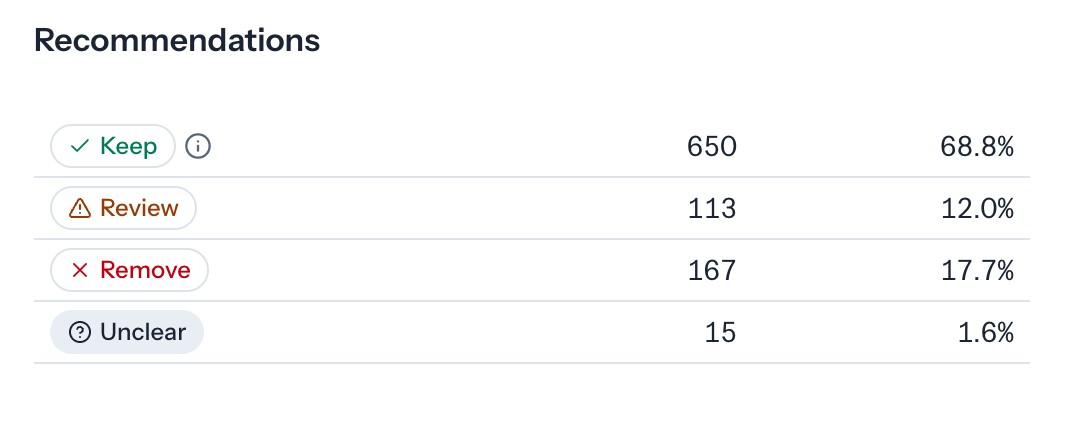
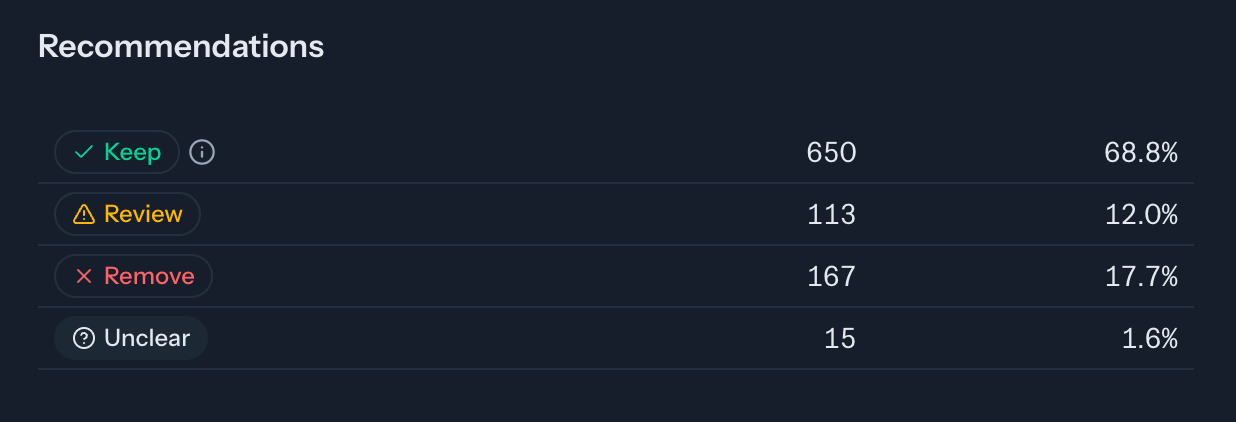
Upload your email list. Email List Cleanup catches duplicates, typos, dead domains, and addresses that won't reach a person, then sorts every row with a plain reason.
- No card to start
- No subscription
- Unused paid credits refundable
Start with 500 free checks.
Bad data is a pain.
- Save time organizing your email lists
- Save money and protect your reputation by removing addresses at domains that can't receive email
How the email list check works
Change a messy member list into a checked, cleaned list in three steps.
Upload your list
Add emails from a CSV or TXT file, or copy and paste.
We check each address
Every address goes through our formatting, domain, and address-pattern checks.
Download cleaned results
Keep, Review, or Remove. Plain verdicts with a reason for each.
What the email checker looks at
Catch what a spreadsheet can't: duplicates, typos, dead domains, and more, before you send.
Typos
gmial.com? We'll suggestgmail.comso you can fix it instead of losing the contact.Gibberish
asdkjfh@looks like keyboard mashing. Worth a second look.Role address
info@andsales@reach a shared inbox, not a person.No-reply address
noreply@addresses aren't read by anyone.Plus address
Spots subaddress tags like
user+tag@so you can see how a contact filed you.Duplicates
Sent twice is once too many. Duplicates are marked Remove, and you're never charged for them.
Lookalike domain
The domain uses characters designed to look like a familiar one (Punycode and IDN detection).
Throwaway domain
Temporary inboxes that expire within hours or days.
Block-listed domain
The domain appears on a public block list (malware, adware, gambling, adult, and similar).
Dead domain
The domain can't receive email anymore, often a business that has closed.
Free host
Addresses at free providers are counted in your report, so you can see how much of a business list is personal addresses.
Refuses all mail
The domain's owner has declared it accepts no email at all (a null MX record), so nothing sent there can arrive.
Clean your list in a few minutes
Create an account and get 500 free checks.
Wallet-friendly terms
Duplicates in your list are never charged.
Re-checking an address is free for 60 days after you checked it.
Credits never expire.
Unused paid credits are refundable for cash within 180 days of purchase, from Settings → Refunds.
Your contacts stay yours
We look up domains, not mailboxes. We never contact anyone's mail server, so no one on your list is ever contacted.
You control retention. Your uploaded list and its results are removed from your account after 32 days by default, or after 3 or 7 days if you choose a shorter window.
Delete any list yourself, at any time, from the Batches screen.
We don't sell or share your list. Your addresses are used for your check and nothing else.
Pay for what you check. Nothing else.
Start with 500 free checks, no card needed. Then buy a pack when you need one. No subscription.
10,000 credits
Get started free$5.00
$0.00050 per credit
25,000 credits
Get started free$10.00
$0.00040 per credit
75,000 credits
Get started free$25.00
$0.00033 per credit
175,000 credits
Get started free$49.00
$0.00028 per credit
400,000 credits
Get started free$99.00
$0.00025 per credit
1,000,000 credits
Get started free$199.00
$0.00020 per credit
What's never charged
- Duplicate addresses
- Addresses you checked in the last 60 days
- Lists that fail on our side
Prices exclude tax, which is calculated at checkout based on your location.
Questions
A pre-send check of every address on your list. Email List Cleanup looks at the formatting, the domain, and the address pattern, then sorts each row into Keep, Review, Remove, or Unclear with one plain reason. It catches duplicates, typos, dead domains, role and no-reply addresses, gibberish, lookalike domains, throwaway domains, and domains on public block lists. It doesn't open a connection to each recipient's mail server to ask whether the mailbox exists. That's what email verifiers do, and it's why they cost more. If bounces from old or purchased lists are your main concern, use a verifier.
Sending the same email to one person twice annoys them. A typo like gmial.com loses a contact you could have fixed in seconds. Addresses at domains that can't receive email anymore don't help your standing with your email platform. A check before you send catches these while they're still cheap to fix, and gives you a list you can hand back knowing the job was done properly.
Upload a CSV or TXT file, or paste your list. You'll see the most it can cost before anything runs. Once you confirm, the check runs in the background. Most small lists finish in a few minutes; larger lists take longer. We email you when it's done, and the results stay in your account to download whenever you're ready.
You start with 500 free checks, and we never ask for a card. That's enough to check a typical small list in full. When you need more, buy a pay-as-you-go pack. There's no subscription and nothing renews.
One credit checks one address. Before a list runs you see the most it can cost, and the final charge is never higher. You're never charged for duplicates, for addresses you checked in the last 60 days, or for a list that fails on our side. Packs start at $5 and are one-time purchases, not a subscription. Unused paid credits can be refunded for cash from Settings → Refunds within 180 days of purchase. Free credits aren't cash-refundable.
No. Credits stay in your account until you use them.
No. We look up domains, not mailboxes, and we never contact a mail server. That means we can't tell whether a particular mailbox exists, or whether a domain accepts mail for every address. Every Keep result says so. If mailbox checks are what you need, an email verifier is the right tool.
Check a list whenever something has changed since you last sent to it: before the first send to a list that's sat unused for months, after merging spreadsheets or signup exports, when you move to a new email platform, or when your email platform warns you about bounces. Re-checking an address you checked in the last 60 days is free, so running a list again before a big send costs little.
Yes. gmial.com? We'll suggest gmail.com so you can fix the contact instead of losing it. Typo rows come back marked Review, and the suggested fix sits in the Notes column of your results CSV.
Your uploaded list and its results are removed from your account after 32 days by default, or after 3 or 7 days if you choose a shorter window in Data & Privacy. You can also delete any list yourself, at any time, from the Batches screen. We look up domains, not mailboxes, so no one on your list is ever contacted.
Clean your member list in a few minutes
Create a free account.
- No card required
- No subscription
- Unused paid credits refundable